![Shield Black Medium (2).png]](https://help.jamesedition.com/hs-fs/hubfs/Shield%20Black%20Medium%20(2).png?height=40&name=Shield%20Black%20Medium%20(2).png)
Welcome to our guide on adding agents to your listings on JamesEdition.
Including agent names and photos builds trust with buyers and gives your listings a personal touch.
You can add agent details with Elite and Elite Plus subscriptions.
Please note: In the Real Estate section, only Elite and Elite Plus subscriptions are available.
If you upload via feed: Agents are automatically assigned through the feed data. If no agents appear in your feed, please get in touch with your CRM provider directly.
If you upload manually: Feel free to add agents yourself. Follow the steps below.
-
Log into your Business account and go to Listings
-
Select the listing you want to assign the agent to
Please note: The agent must be created through your Team section before they can be assigned. Feel free to refer to this article for more details.
- Scroll the page to the section Lead Assignment, click on the Also send leads to field and choose a property agent from the drop-down list.
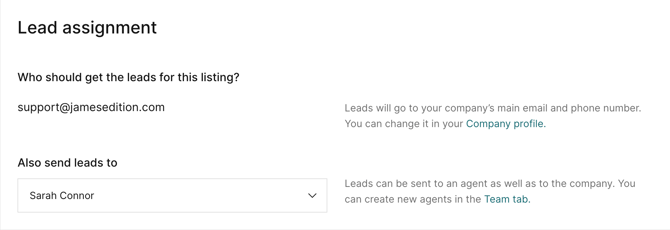
Please note: The assigned agent will automatically receive a copy of any inquiry related to their listing. If you’d prefer they don’t receive these notifications, simply update the agent’s email address accordingly.
If you have any additional questions, please check our Help Center Articles here.