---
title: Why is my listing not visible? Listing status, refusals and statistics
description: Check out your listing's status onJamesEdition
---
[Skip to content](https://help.jamesedition.com/en/how-to-check-your-listings-status#main-content)
English
Show submenu for translations
[Customer portal](https://help.jamesedition.com/customer-portal?hsLang=en)
![Shield Black Medium (2).png\]](https://help.jamesedition.com/hs-fs/hubfs/Shield%20Black%20Medium%20(2).png?height=40&name=Shield%20Black%20Medium%20(2).png)
Open main navigation
Close main navigation
- English
Show submenu for translations
- [Customer portal](https://help.jamesedition.com/customer-portal)
- [Go to jamesedition.com](https://www.jamesedition.com/)
[Go to jamesedition.com](https://www.jamesedition.com/)
Find relevant articles by using keywords in the search bar
- There are no suggestions because the search field is empty.
1. [Advice and answers from the JamesEdition Team](https://help.jamesedition.com/en?hsLang=en)
2. [For Business](https://help.jamesedition.com/en/for-business?hsLang=en)
3. [Security & Support](https://help.jamesedition.com/en/for-business?hsLang=en#security-support)
# Why is my listing not visible? Listing status, refusals and statistics
## Check out your listing's status on JamesEdition
If you cannot find one of your listings on JamesEdition, the first step is to check its status in your **Business Account**. A listing may be waiting for review, refused, unpublished, or temporarily unavailable because of a subscription or feed issue.
Most visibility issues can be identified directly from the **Listings** section of your Business Account.
### Check your listing status
Log in to your **Business Account** and go to **Listings**.
In the search bar under **My listings**, you can find a specific listing using its:
- Listing ID or reference number
- Title
- Location
- Assigned agent
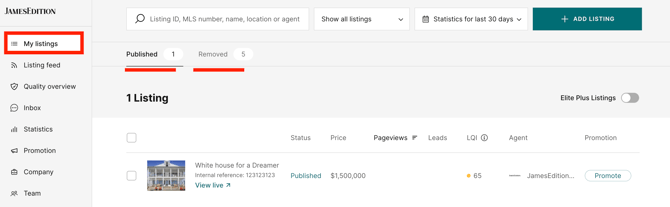
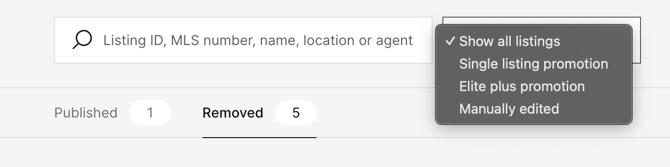
You can also filter your listings by status to see which listings are **published** or **removed**, as well as listings participating in promotions or those that have been manually edited.
### What does my listing status mean?
#### **Pending review**
New listings and certain listing updates are reviewed before they are published on JamesEdition.
Please allow up to **24 hours** for the review to be completed. If your listing remains pending for longer, contact our Support team.
#### **Refused**
A refused listing does not currently meet JamesEdition's publication requirements.
To see the specific reason, move your cursor over the **Refused** status in your Business Account.

Some common reasons for refusal include:
- The listing price is below our minimum publication value.
- Photos are missing, do not meet our quality requirements, or contain watermarks or contact information.
- The description contains contact details or external links.
- The address or location information is incomplete.
- The property or listing type is not eligible for publication on JamesEdition.
- Required listing information is missing.
You can review our [moderation rules](https://help.jamesedition.com/en/how-does-jamesedition-moderation-work?hsLang=en) for more information.
If you have corrected the issue but the listing is still refused, send the listing reference to [support@jamesedition.com](mailto:support@jamesedition.com), and our team can review it again.
#### **Unpublished or inactive**
A listing may no longer be published because:
- It was manually unpublished.
- It is no longer being sent through your CRM feed.
- The listing is no longer available.
- Your subscription is inactive or has ended.
Check the listing in your Business Account to determine its current status.
#### **My listing comes from a CRM feed but is not showing**
If your listings are imported automatically through a CRM or XML feed, new listings and updates may take up to **24 hours** to appear on JamesEdition.
If more than 24 hours have passed, first check that the listing is still active and being sent to JamesEdition from your CRM.
You should also make sure that the listing contains all the information required for publication, such as the price, location, property type, and sufficient images.
If the listing is being sent correctly but is still missing after 24 hours, contact [support@jamesedition.com](mailto:support@jamesedition.com) and include the listing reference so we can investigate the import.
#### **My listing is published but I can't find it in search results**
If your Business Account shows the listing as **Published**, but you cannot find it when searching on JamesEdition:
- Check that you are searching in the correct location and category.
- Remove any search filters that could exclude the listing, such as price, property type, bedrooms, or other criteria.
- Make sure the listing has accurate and complete location and category information.
- Check the live listing directly from your Business Account to confirm that it is published.
If the listing is published but consistently appears under the wrong location or category, contact our Support team so we can investigate.
I updated my listing, but the changes aren't showing
The time required for an update to appear depends on how your listings are managed.
**Manual listings:** Changes made directly through your Business Account usually appear on the live site within **15–30 minutes**.
**CRM or feed listings:** Changes sent through an integration can take up to **24 hours** to sync with JamesEdition.
#### **Manually edited CRM listings**
If your listings normally come from a CRM feed, you can also identify listings that have been **manually edited**.
After you manually customize an integrated listing, JamesEdition will prioritize the manual information over certain automatic feed updates. The listing will be marked as **Manually edited**, and a padlock icon will appear on its thumbnail.
Price and availability can continue to be updated from the feed.
**Tip:** For more details on customized listings, see [this article](https://help.jamesedition.com/en/what-is-a-hybrid-integration-and-how-to-use-it?hsLang=en).

#### **Still can't find your listing?**
If you have checked the steps above and your listing is still not visible, contact us at [support@jamesedition.com](mailto:support@jamesedition.com).
Please include:
- Your listing ID or reference number
- Your company name
- A short description of the issue
- A screenshot, if relevant
Providing the listing reference will help our team investigate the issue more quickly.
- [General](https://help.jamesedition.com/en/general?hsLang=en)
- [For Business](https://help.jamesedition.com/en/for-business?hsLang=en#main-content)
- [Getting Started with JamesEdition](https://help.jamesedition.com/en/for-business?hsLang=en#getting-started-with-jamesedition)
- [Listing Guidelines & Quality](https://help.jamesedition.com/en/for-business?hsLang=en#listing-guidelines-quality)
- [Business Account Management](https://help.jamesedition.com/en/for-business?hsLang=en#business-account-management)
- [Managing Your Listings](https://help.jamesedition.com/en/for-business?hsLang=en#managing-your-listings)
- [Advertising & Promotion](https://help.jamesedition.com/en/for-business?hsLang=en#advertising-promotion)
- [Lead Generation & Inquiries](https://help.jamesedition.com/en/for-business?hsLang=en#lead-generation-inquiries)
- [Billing & Subscription Management](https://help.jamesedition.com/en/for-business?hsLang=en#billing-subscription-management)
- [Analytics & Reporting](https://help.jamesedition.com/en/for-business?hsLang=en#analytics-reporting)
- [Security & Support](https://help.jamesedition.com/en/for-business?hsLang=en#security-support)
- [For Buyers](https://help.jamesedition.com/en/for-buyers?hsLang=en)
[-1.png?width=21&height=24&name=Shield%20Black%20Medium%20(2)-1.png "Chill listening crop-3")](http://jamesedition.com)
jamesedition.com
Copyright © 2026, JamesEdition B.V.®