![Shield Black Medium (2).png]](https://help.jamesedition.com/hs-fs/hubfs/Shield%20Black%20Medium%20(2).png?height=40&name=Shield%20Black%20Medium%20(2).png)
JamesEdition connects your business with potential buyers and property owners. All leads are available directly from your Business Account, and you can also receive email notifications so your team can respond quickly.
Types of leads
There are two types of leads you can receive on JamesEdition:
Standard inquiries
A potential buyer finds one of your listings on JamesEdition and submits a message or request through the listing page.
The inquiry is delivered to your Inbox in your Business Account and, depending on your lead routing settings, is also sent by email to the relevant office or agent.
Vendor Leads
A private property owner submits their property to JamesEdition and asks to be matched with an agent.
JamesEdition reviews the request and forwards relevant opportunities to selected agencies. Vendor Leads are clearly labelled and appear at the top of your Inbox. They are also delivered by email.
Because these property owners are actively looking for an agent, we recommend responding as quickly as possible.
How leads are delivered
You can receive leads in two places:
- Inbox: All Standard Inquiries and Vendor Leads are stored in the Inbox of your Business Account.
- Email: Lead notifications are also sent by email according to your office and agent routing settings.
Your Business Account Inbox is the best place to confirm whether a lead has been successfully received, even if you cannot find the corresponding email notification.
How lead routing works
If your agency has multiple agents, you can control who receives inquiries.
Assign listings to agents
Each listing can be assigned to a specific agent. When a buyer submits an inquiry about that listing, the lead can be routed to the agent assigned to it.
Make sure your listings are assigned to the correct agents, particularly when members join or leave your team.
Send all inquiries to the office
If you prefer to manage all leads centrally, you can configure your account so that inquiries are sent to the office email instead of individual agents.
Go to:
Team → Settings
and review your inquiry routing preferences.
When the option to send all inquiries to the office is enabled, individual agents will not receive lead notification emails for their assigned listings. The leads will still be available in your Business Account.
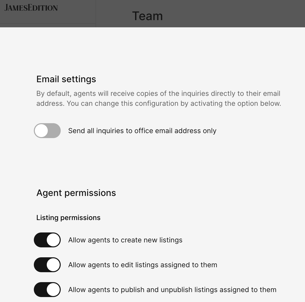
Important: "Featured Agents" still receive lead emails when the office has 'Send all inquiries to office email address only' on.
Once the "Featured Agent" status expires, lead delivery reverts to office-only routing.
The setting also doesn't affect copies sent to office-level addresses, like an office's secondary lead email ( if provided).
Add a secondary leads email
By default, lead notifications are sent to the primary email address configured for your office.
If you would like another email address to receive lead notifications as well, you can add a Secondary Leads Email under:
Company → Contact information
This is useful if several members of your team need visibility over incoming inquiries.
Tips for managing your leads
- Check your Inbox regularly. Buyers and sellers are more likely to engage when they receive a prompt response.
- Prioritise Vendor Leads. These property owners have specifically requested to be matched with an agent and are waiting to hear from you.
- Keep your listings up to date. Accurate and complete listings help attract more relevant inquiries and reduce unnecessary back-and-forth.
- Review the full inquiry before responding. Understanding what the buyer or seller is looking for will help you provide a more relevant and personalised response.
- Keep your team information up to date. If an agent leaves your company, make sure their listings and lead routing are reassigned.
Frequently asked questions
Why am I not receiving leads?
If you believe you are missing leads, check the following:
1. Check that your listings are active: Make sure the relevant listings are currently published on JamesEdition and that your account is active.
2. Check your office email address: Go to: Company → Contact information and confirm that your office email address is correct. If you use a Secondary Leads Email, check that address as well.
3. Review your inquiry routing settings: Go to: Team → Settings and check whether your account is configured to send all inquiries to the office email.
If this option is enabled, individual agents will not receive lead notification emails, even when they are assigned to the listing.
4. Check the agent assigned to the listing: If inquiries are routed to individual agents, make sure the listing is assigned to the correct person and that their email address is up to date.
If an agent has left your company, reassign their listings to an active team member.
5. Check your spam or junk folder: Lead notifications are sent from contact@account.jamesedition.com, with the buyer's email address set as the reply-to address. Some company email servers may filter these messages. We recommend adding contact@account.jamesedition.com to your safe senders or allowlist.
6. Check your Business Account Inbox: All leads are stored in your Business Account Inbox. If you can see the lead there but did not receive the corresponding email, your leads are being generated correctly and the issue is most likely related to email delivery.
If everything is configured correctly and you are still not receiving lead emails, contact support@jamesedition.com with your company name. We can send a test inquiry to help identify the issue.
Does unsubscribing from JamesEdition newsletters stop lead emails?
No. Unsubscribing from marketing newsletters does not stop lead notifications. Lead notifications, buyer alerts, saved-search emails, and marketing communications are managed separately.
Can multiple agents access the same Inbox?
Each agent can access inquiries related to their assigned listings. If you manage multiple offices, you can use the Master Dashboard to get an overview across your offices.
How do I know if a message is a Vendor Lead or a Standard Inquiry?
Vendor Leads are clearly labelled in your Inbox and appear at the top of your message list.
Standard Inquiries are generated when a potential buyer contacts you directly from one of your listings.
Where can I see my previous leads?
All your leads are stored in the Inbox of your Business Account, where you can review previous inquiries and conversations.
Still need help?
If you have checked your settings and are still experiencing issues with your leads, contact us at support@jamesedition.com and include your company name so our team can investigate.