![Shield Black Medium (2).png]](https://help.jamesedition.com/hs-fs/hubfs/Shield%20Black%20Medium%20(2).png?height=40&name=Shield%20Black%20Medium%20(2).png)
Your personal details are in Account Settings: click your name at the top right and select Account Settings. There you can change your name, phone number and password. Your company details are on a different page: see How do I edit my company information?
How do I change my name or phone number?
-
Click your name at the top right and select Account Settings.
-
Click Edit next to Your name or Your phone number.
-
Make the change and click Save.
How do I change my password?
-
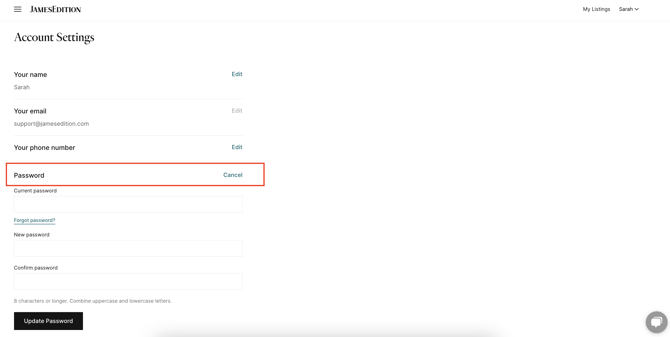
In Account Settings, click Update next to Password.
-
Enter your Current password.
-
Enter your New password and type it again in Confirm password. It must be 8 characters or longer and combine uppercase and lowercase letters.
-
Click Update Password.
What if I don't remember my current password?
In the Password section, click Forgot password?. We send instructions for resetting your password to your email address. If they don't arrive shortly, check your spam folder. If you can't log in at all, see How do I log in or reset my password?
Can I change the email I log in with?
No. The Your email field in Account Settings can't be edited. To log in with a different email, that email needs its own account. In a Business Account, an admin can create it:
- In your Business Account, go to Team and click Add team member.
- Enter the name and the new email in Email, then click Save changes.
- In that team member's details, click Send activation email. The activation link goes to the new email and is valid for 7 days.
To give the new account admin rights, an admin turns on Activate user as admin under Admin level. For details, see How can I add or edit admins and agents on my account?
Where do I manage my email notifications?
In Account Settings, under Notification Settings. See How do I turn off my notification settings?
Still need help?
Contact your JamesEdition Account Manager, or support@jamesedition.com if you don't have one.