![Shield Black Medium (2).png]](https://help.jamesedition.com/hs-fs/hubfs/Shield%20Black%20Medium%20(2).png?height=40&name=Shield%20Black%20Medium%20(2).png)
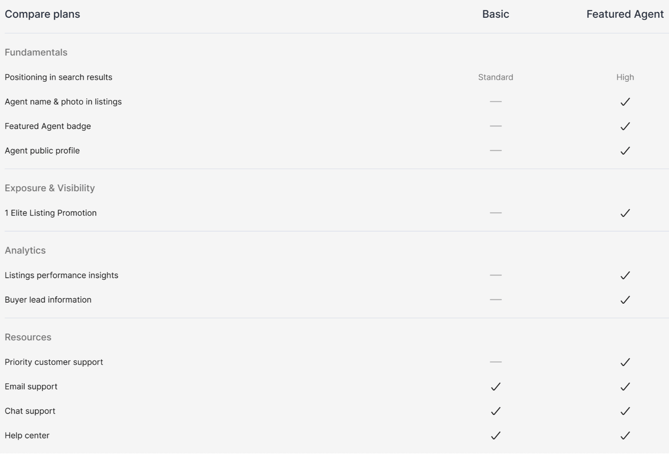
The Featured Agent plan is designed to help real estate agents stand out on JamesEdition.
With premium placement, a public profile, and detailed analytics, Featured Agents receive up to 7× more impressions compared to Basic accounts — giving you more visibility, more buyer inquiries, and a stronger personal brand on the world's largest luxury marketplace.
Please note: This option is currently available for US agents with up to 10 listings in their portfolio.
What's Included:
- Featured Agent Badge: Your headshot, name, and a distinctive badge appear across search results and listing pages — building trust at first glance.
- Premium Listing Placement: Your listings gain higher positioning in search results, attracting more views and buyer inquiries.
- Public Agent Profile: A personalized profile page showcasing your bio, area of interest, languages, social links, listings count, and average price.
- Performance Analytics: A dedicated dashboard to track your listing views, impressions, and leads over time — so you can measure what's working.
- One featured Elite Plus listing
Please note: There is no option to manually select or change the promoted property. The system selects your highest-quality live listing and pushes it automatically. The property changes only when another of your listings scores higher or the current one goes offline.
How to upgrade?
- Log in to your JamesEdition account and click Subscription in the left menu.
- Click "Upgrade" on the Featured Agent card.
- Review the plan details and confirm your payment method.
- Once confirmed, your Featured Agent badge, public profile, and premium placement will activate immediately.
How do I cancel my Featured Agent plan?
- Log in to your JamesEdition account and click Subscription in the left menu.
- Under Current subscription, click Cancel subscription.
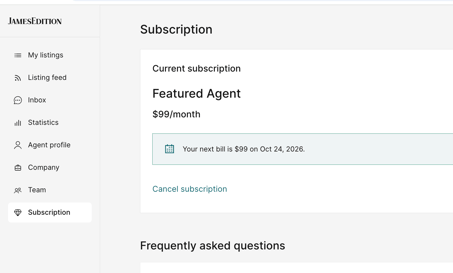
Your plan stays active until the end of your current billing period, and you won't be charged again. Until then you keep your Featured Agent badge, premium placement, public profile and analytics. When the period ends, your account returns to a free Basic account.
I'm moving to a new agency. What happens to my Featured Agent plan?
Your plan doesn't move with you automatically. To transfer it, send a request to support@jamesedition.com with your new agency's name and the email address you'll use there, and we'll move your plan to your new account.